Stack versioning
Cycloid allows you to manage stack versions, ensuring that stack maintainers can use a standard development workflow when working on their stacks, with development branches and tag based releases.
Why version a stack?
Stack versioning allows you to control the upgrade process of your components, ensuring that end-users can upgrade at the right time and stack maintainers can make their changes safely.
For stack users
Creating a component
When creating a new component, after selecting the stack you want to use, you will be prompted to select the version of the stack you want to base your component on.
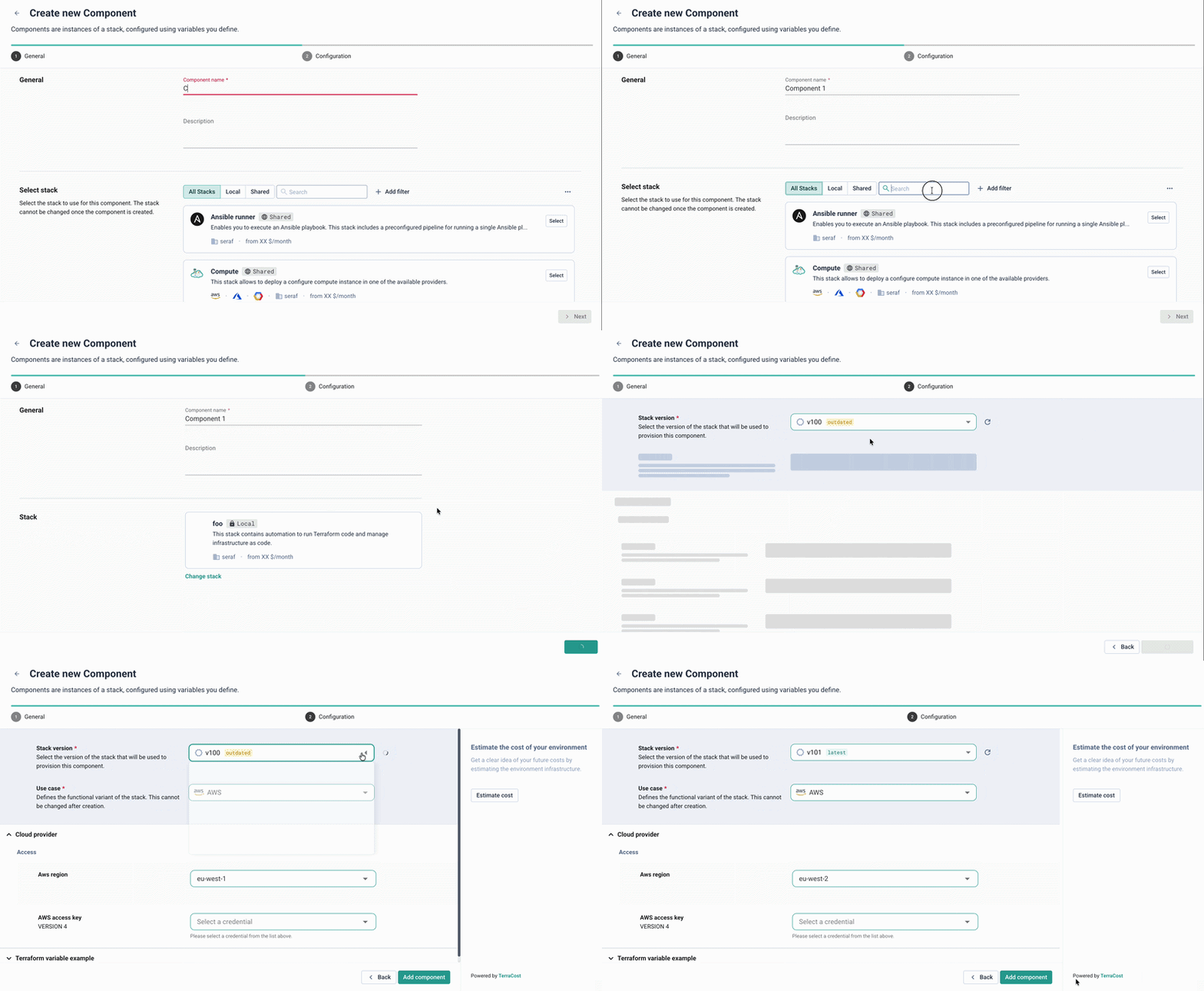
By default, the latest production version (tag) of the stack will be selected, if no such tags exist, the default branch of your catalog repository will be used.
Upgrading a component version
Stack versioning allows you to upgrade your components at your own pace.
When a new version of a stack is released, your components will stay on the previous version until you are ready to make the upgrade.
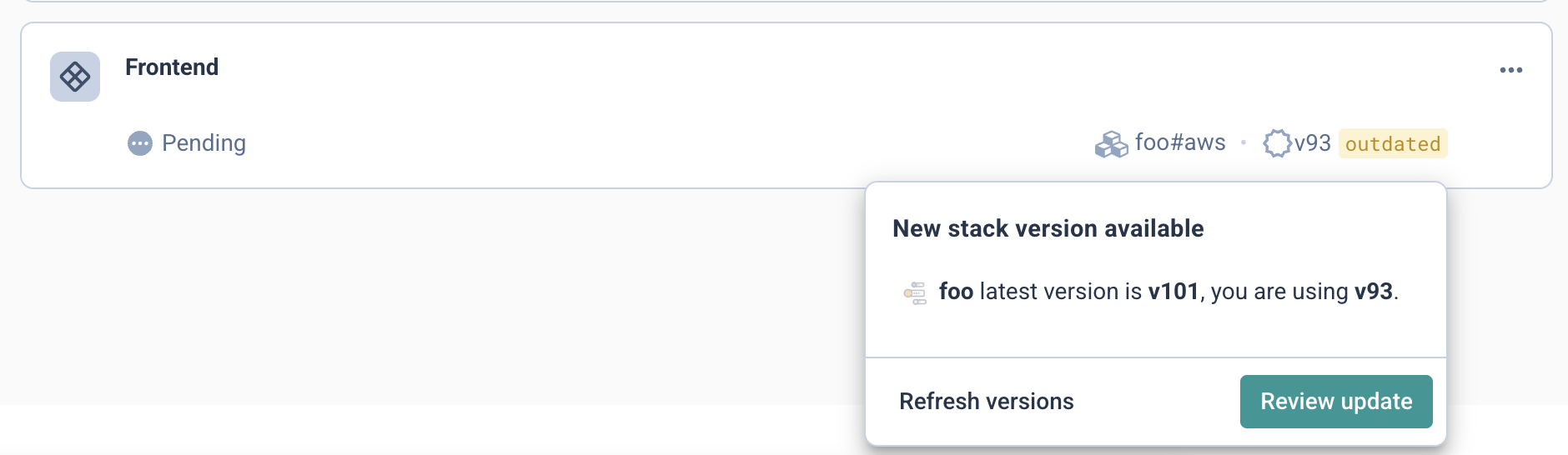
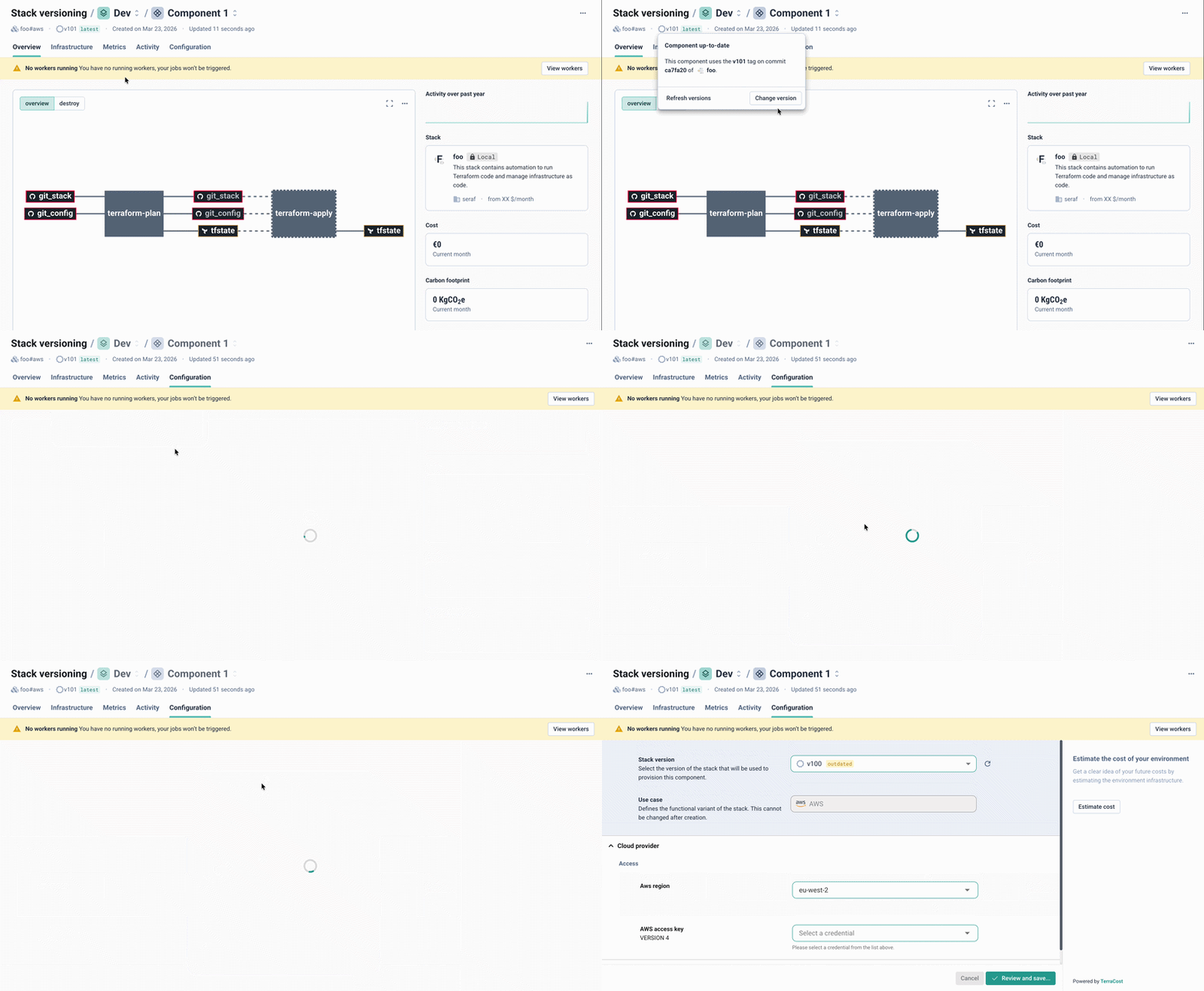
Once the version of your stack becomes outdated, an alert will be shown on the component, as well as its parent environment and project, to notify you an update is available.
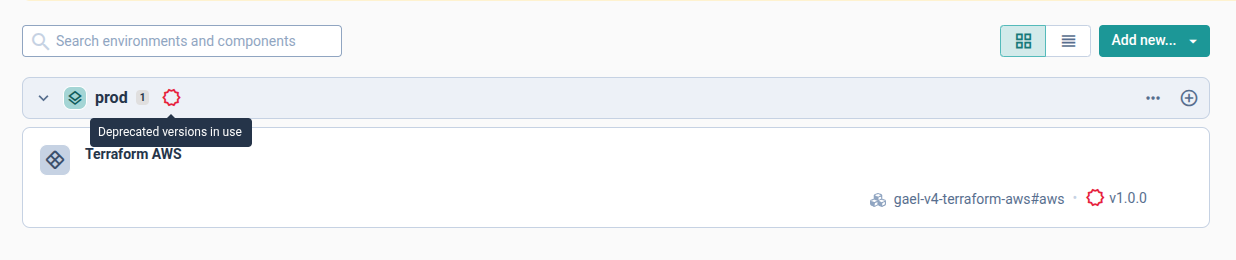
A warning will also be displayed in the case where a component is using a version of a stack that has since been deleted, and should be updated at the earliest convenience.
When you are ready to proceed with an update, in the component configuration tab, you will first be prompted to choose which version you want to change the component to.
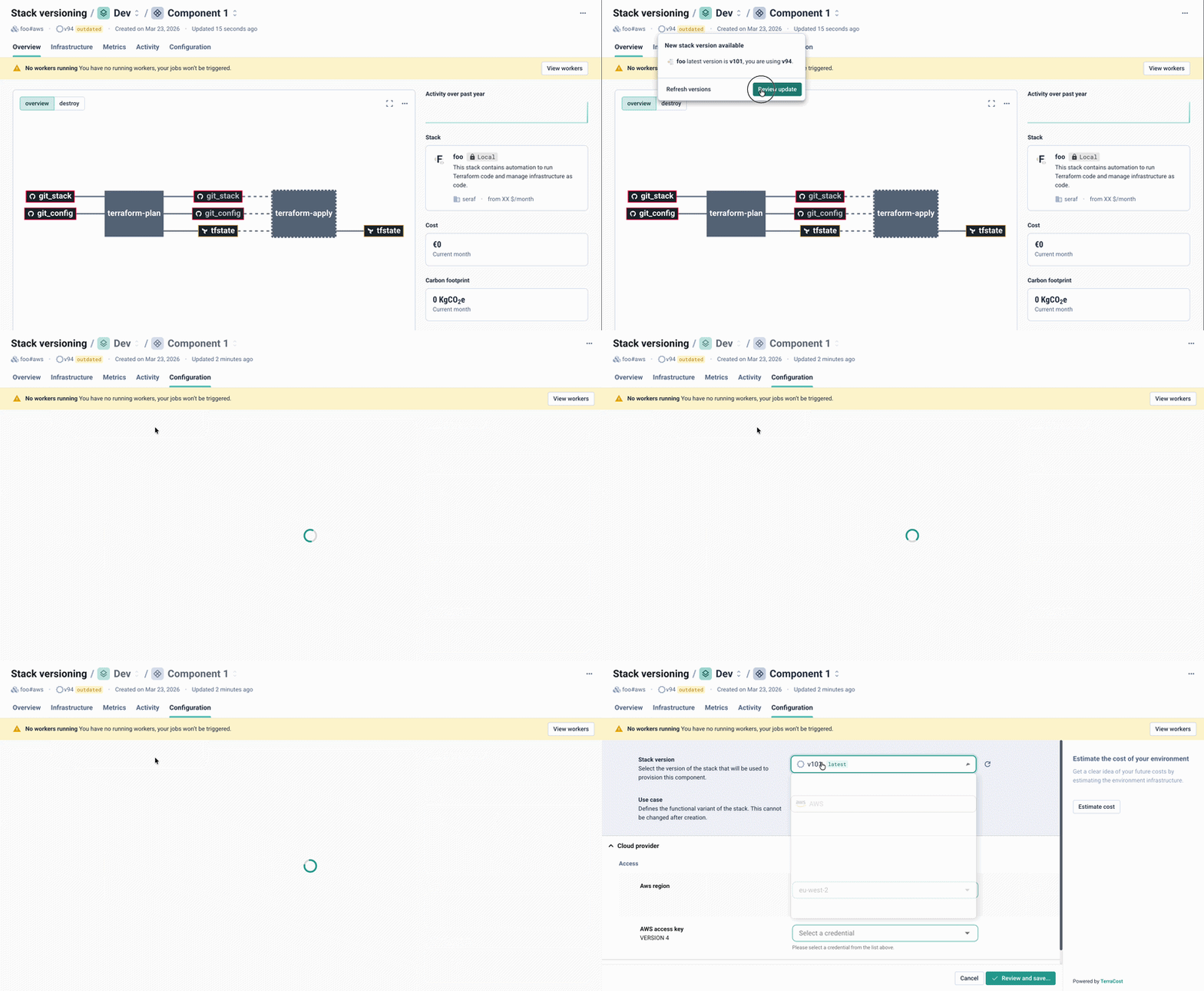
From here, you will then be able to make any changes required to your configuration forms.
Downgrading a stack version
In the event where you need to return to a previous version of your stack, you can also downgrade the version from the version tag popup.
Listing available versions
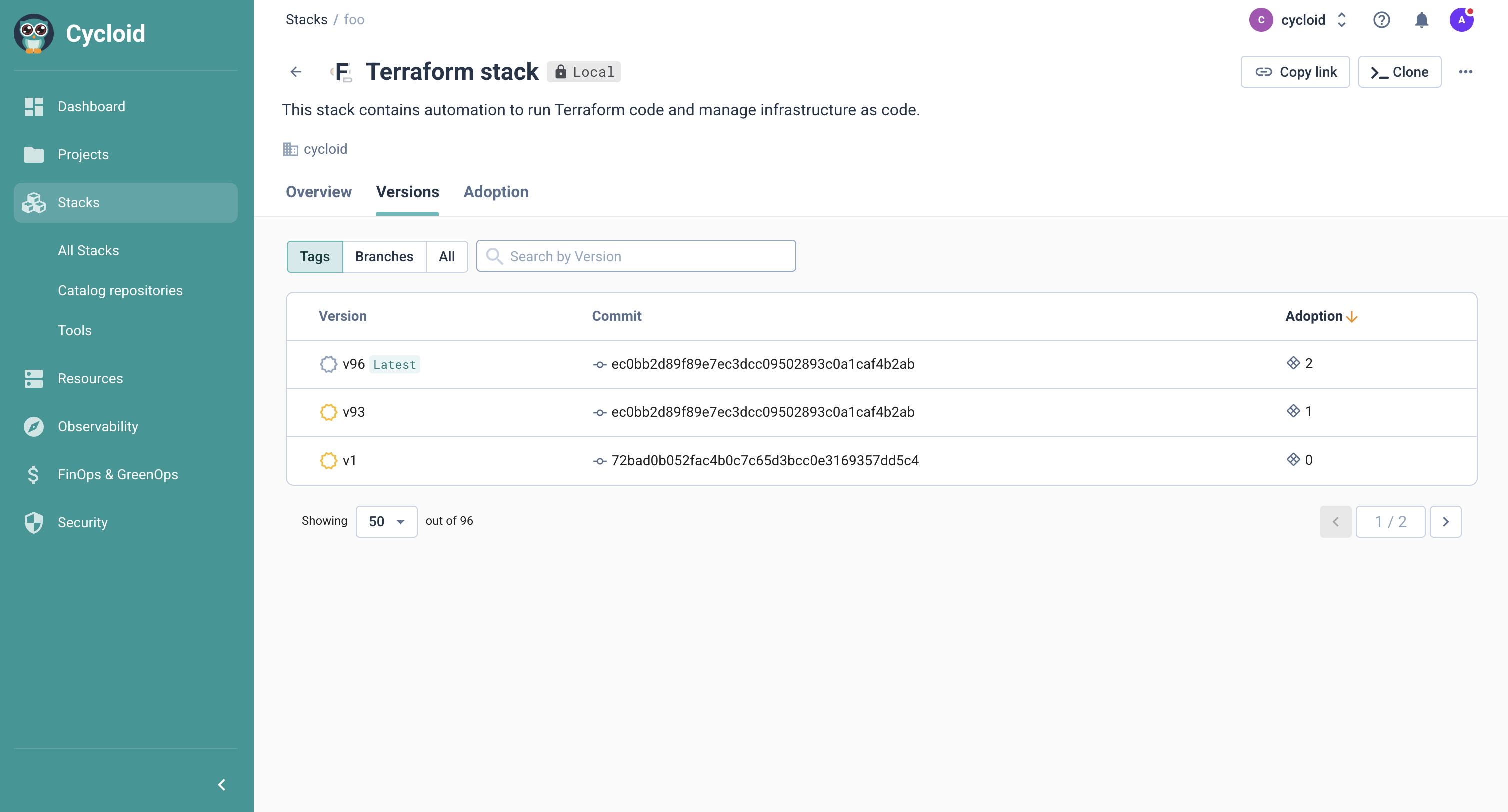
In order to get an overall view of the versions available for a stack, you can visit the "Versions" tab of the stack detail page.
In the "tags" section, you will find all of the production releases of the stack. In the "branches" section, you will find all development and custom versions.
For stack maintainers
Versioning a stack in Cycloid is done using Git tags and/or branches:
- Tags are used to track versioned releases of a stack. They allow you to reference a specific stack version (example: Catalog single stack
git tag v1.2.0, Catalog multi stacksgit tag my-stack/v1.2.0). - Branches follow every change pushed to the branch, allowing you to stay up-to-date with the latest commits and always reflect the most recent version (example
main,development,staging...).
Adapting Your Stack for Cycloid Versioning
When making a stack generic and compatible with Cycloid's versioning feature, it is sometimes necessary to update the stack pipeline configuration. This ensures that the stack can properly use the selected version (branch or tag) during component creation.
These changes are typically applied in the pipeline.yaml file of your stack.
This configuration is required when the pipeline uses a Concourse Git resource to fetch files (e.g., Terraform) from the stack's Git repository.
Update pipeline.yaml as follows:
- name: git_stack
  type: git
  icon: github-circle
  source:
    uri: ($ .catalog_repository_url $)
    ($- if eq .stack_version_type "tag" $)
    tag_filter: ($ .stack_version_ref $)
    fetch_tags: true
    ($- else $)
    branch: ($ coalesce .stack_version_ref .catalog_repository_branch $)
    ($- end $)
This configuration allows the pipeline templating system to automatically configure the Git resource to use the stack version selected by the user when creating a component.
Git workflow proposal
Here is an example of a concrete workflow you can follow when developing and releasing a new stack version.
Let's assume your stack repository contains a stack named my-stack, with the main branch holding your stable, production ready code.
1) Checkout a new feature branch from main
# clone (if needed)
git clone git@github.com:your-org/my-stack.git
cd my-stack
# create a feature branch from main
git checkout -b feature/add-foo main
git push -u origin feature/add-foo
2) Make changes on the feature branch
Implement the stack changes, commit and push your changes to the feature branch:
git add .
git commit -m "feat(stack): add foo support in my-stack"
git push
Once you've made your changes, you can test them in Cycloid by creating a test component that points to your feature branch:
- Start by going to the page of your catalog repository, and click on the refresh button, so that Cycloid knows to fetch your latest branch.
- Create a new component, selecting your stack
my-stackand specifying the branchfeature/add-fooas the version.
3) Test and iterate
Using the test component you've just created, you can now test your changes: fill forms, run pipelines, deploy resources, and verify everything works as expected.
If you come across any bugs or issues, you can continue to commit changes to your feature/add-foo branch, and upgrade your test component to pick up the latest iteration.
4) Open a Pull Request to merge into the main stack branch
Once everything is validated and you are happy with your changes, you can proceed to open a PR to merge your feature branch into the main branch of the stack, using your standard PR review process.
5) Create a new stable version tag
After your PR is merged, you can now create a new tag from the main branch to release a stable version of your stack.
For a single-stack repository:
git tag -a v1.2.0 -m "Release my-stack v1.2.0"
git push origin v1.2.0
For a catalog repository with several stacks:
git tag -a my-stack/v1.2.0 -m "Release my-stack v1.2.0"
git push origin my-stack/v1.2.0
After the tag is pushed, you can refresh the catalog repository in the Cycloid console so thatthe new tag is detected. From here, you can proceed to create new components based on this stable release.
Best practices for tags:
- Unless you are using a single-stack repository with your stack files at the root of the repo, always prefix your tags with the stack canonical (e.g.,
my-stack/v1.2.0). This ensures Cycloid can correctly identify which stack the tag belongs to. - We strongly recommend using semantic versioning naming convention (SemVer) for your tags (e.g.,
v1.2.0,v2.0.0, etc.) so that Cycloind can reliably parse and order your stack versions.
Stack adoption overview
You can get an overview of your stack versions and their adoption directly from the stack detail page.
Under the "Versions" tab, you can view all the versions of your stack, along with the associated commit ID, and how many components are currently using each version.
By clicking on the adoption count of a version, or by navigating to the "Adoption" tab, you can get a more detailed breakdown of which components are using which versions of your stack.
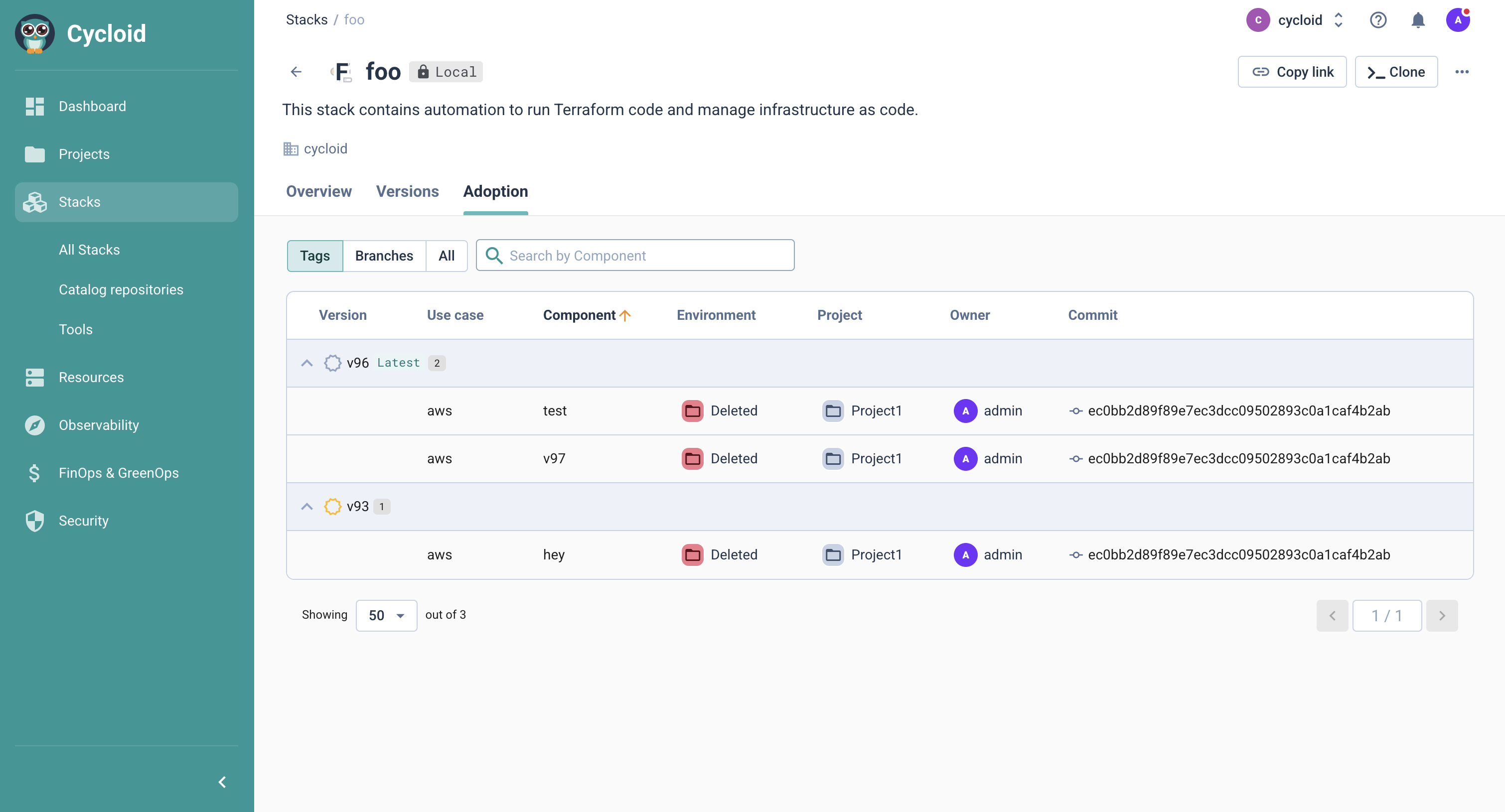
This view also gives you a breakdown by project, environment and use case, allowing you to easily identify where outdated versions of your stack are being used.
From here, you can navigate directly to the component detail page to perform any necessary upgrades or changes, see Upgrading a component version.