API
Introduction
The Cycloid product is written in Golang (Backend) and NodeJS (Frontend). In simple terms, this means that anything you do in the Cycloid web console can also be done or automated using our API.
You can make raw API calls, but it might often be easier to use our Cycloid CLI, which is also embedded in our cycloid-toolkit Docker image for pipelines.
Prerequisites
To use our API, you need an API key for authentication. Instructions on how to create an API key are explained in the following sections.
Concepts
API key
If you go deeper in workflow automation and want to use Cycloid API to automate the creation of the project, external pipeline triggering, send Events, ... Api Keys are made for you.
Api Keys offers a way to authenticate on Cycloid API using a token with dedicated permissions.
API Keys allow you to create a key with specific permissions for a desired use case.
Details
Once you are on the details page, you can have a more insightful view about the API Key.
It's also possible to change the owner, name or a description of the API Key.
It consists of the two sections:
- Api Key name and description:

- Permissions Overview:

Create API Key
First, we need to name the API Key and write an optional short description of its purpose.

Then, we define the scope for individual actions. These actions can be of various types: creating a project, deleting a credential, reading roles, etc.
These policies can also be narrowed down to specific entities. So that, if you were to have multiple credentials, you could create a role containing policies only for a specific subset of credential. Thus allowing you to have a thinner control on who can do what.
When the API key is created successfully, a modal containing API Key will be displayed.
Be sure to make a copy of the access key below. It’s only displayed upon creation, and you won’t be able to retrieve it later.

Delete API Key
The API Key can be deleted in the API Key details view by clicking on the delete button

or in the list view, where you can use the bulk delete option if you want to delete one or more API Keys.

Deleting API Key will revoke it. Before deleting the API Key, make sure it's not used by script or other users, and that deletion won't break anything.
API Keys List
List view displays all available API Keys that exists inside of the organization.

Personal API key
A personal API key lets any member of an organization use the API with exactly the permissions they have in the console: no more, no less. It holds no permissions of its own. On every request, Cycloid resolves its owner's organization role and the roles of the teams they belong to, as it does for their session. A change of role or team therefore applies to the very next request made with the key.
A personal API key belongs to one organization and works there, and on its child organizations exactly as its owner's session does when they switch to one. A member of several organizations creates one key per organization they need, in an organization they are a member of: not from a child organization reached through its parent.
Members manage their personal API keys from their profile, under Profile > Personal API keys. The page lists their keys of every organization they are a member of, and creates new keys in the organization currently selected. Every member can see, create, regenerate and revoke their own keys, and only their own. A personal API key cannot manage personal API keys: that needs a session. Nor can it create, change or delete the organization's API keys, whatever its owner's role.

Create a personal API key
Give the key a name and choose how long it stays valid: 1 week, 1 month or 3 months, the maximum lifetime of a personal API key. Once the validity is over, the key is refused: regenerate it to extend it.
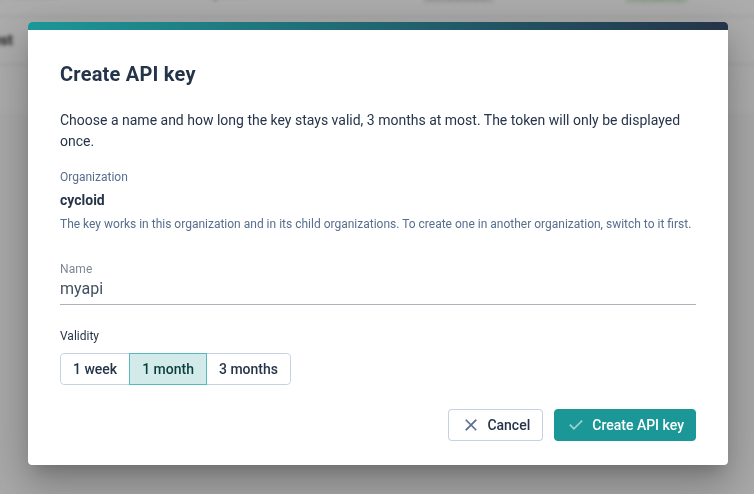
The token is only displayed once, when the key is created or regenerated. Copy it then: you won't be able to retrieve it later.
Regenerate a personal API key
Regenerating a key replaces its token: the previous token is refused from the next request on. The key keeps its name, and its validity restarts from the regeneration, with the duration chosen at creation.
Revoke a personal API key
Revoking a key deletes it: it is refused from the next request on.
What refuses a personal API key
- Its validity is over.
- Its token was regenerated: only the latest token is accepted.
- It was revoked.
- Its owner left the organization, or their account was deleted: their personal API keys in that organization are deleted with their membership.
Changing your password or signing out of every session does not revoke your personal API keys, as with the personal access tokens of other platforms: revoke them from your profile.
While an organization is blocked (expired licence or subscription), its personal API keys only hold the restricted access of the blocked organization. Their owner still sees and revokes them, but cannot regenerate them until the organization is unblocked.
Events performed with a personal API key name the key and link to its owner's membership.
Personal API keys stay in their owner's profile: they are not listed in Security > API keys, and organization admins cannot see nor revoke them. Their keys follow the member instead:
- Removing a member from the organization deletes their personal API keys there: use it to cut their access at once, for instance when a key leaked.
- Changing their role or teams changes what their keys can do from the next request on, but the keys stay valid.
- Giving them a role that does not let them list and revoke their personal API keys
(
organization:api_key:personal:readandorganization:api_key:personal:delete) stops their keys until a role grants both again, so no key keeps working out of its owner's reach.
Reference
- See Cycloid api documentation.
- See Cycloid api swagger file.